As an Amazon Associate, we earn from qualifying purchases. Some links on this site are affiliate links at no extra cost to you. Our recommendations are based on thorough research and editorial judgment.

10 Best Affordable Smart Home Hubs for 2026

You walk into your living room after a long day, only to find the lights still flickering, the thermostat set to a temperature you never chose, and the TV unresponsive to your voice command. It’s the endless juggling of apps, remotes, and inconsistent connections that makes a “smart” home feel anything but convenient.
The difference between a reliable hub and a frustrating one often comes down to support for the latest standards, true multi‑protocol compatibility, and the ability to run automations locally without a cloud lag.
In this guide you’ll discover ten affordable hubs under $100, selected for Zigbee, Matter, and voice‑assistant support, plus real‑world performance tests; by the end you’ll know which device fits your setup, budget, and automation goals.
Key Takeaways
If you want a hub that works with almost any smart device now and in the future, pick one that supports Matter and Zigbee. You’ll get seamless compatibility without hunting for adapters, and your lights, sensors, and locks will all talk to each other. This keeps your home flexible as new products hit the market.
For anyone who worries about dropped Wi‑Fi signals, choose a hub with dual‑band Wi‑Fi or Ethernet. The extra 5 GHz band speeds up OTA updates, and the wired option gives rock‑solid reliability when the wireless gets crowded. Your devices stay online, even during peak usage.
What makes this type of hub stand out is a compact, plug‑in design that includes the power adapter and cables you need. You won’t have to buy extra accessories or scramble for a spare outlet. The small footprint fits nicely on a shelf or behind a TV.
You get local automation capability without depending on the cloud. If the internet goes down, your lights still turn on and your door lock still works. This peace of mind is priceless during outages.
The built‑in voice‑assistant integration solves the hassle of adding extra hardware. Alexa, Google Assistant, or Siri can control your home right out of the box, so you can speak commands without a separate speaker. Your smart home feels truly hands‑free.
| Tapo Smart Hub with Built-in Chime (H100) |  | Best Overall | Primary Protocol(s): Sub‑1 GHz low‑power (Tapo) | Wi‑Fi Frequency: 2.4 GHz required for hub connectivity | Power Source: Battery powered (hub) | VIEW LATEST PRICE | Read Our Analysis |
| SOPHIA Tuya Smart Hub WiFi Gateway with Bluetooth Bridge |  | Budget-Friendly Pick | Primary Protocol(s): Bluetooth + Wi‑Fi (2.4 GHz) | Wi‑Fi Frequency: 2.4 GHz only | Power Source: AC adapter (5 V / 2 A) | VIEW LATEST PRICE | Read Our Analysis |
| THIRDREALITY Smart Bridge MZ1 – Zigbee to Matter Connectivity |  | Most Versatile | Primary Protocol(s): Zigbee → Matter bridge | Wi‑Fi Frequency: 2.4 GHz (Wi‑Fi) | Power Source: USB‑C power (adapter) | VIEW LATEST PRICE | Read Our Analysis |
| AduroSmart ERIA Smart Home Hub (ZigBee Alexa Google) |  | Best For Beginners | Primary Protocol(s): Zigbee (2.4 GHz) | Wi‑Fi Frequency: 2.4 GHz (Wi‑Fi) | Power Source: AC adapter (included) | VIEW LATEST PRICE | Read Our Analysis |
| Broadlink Mini 3 Smart Hub – Alexa Google Compatible | 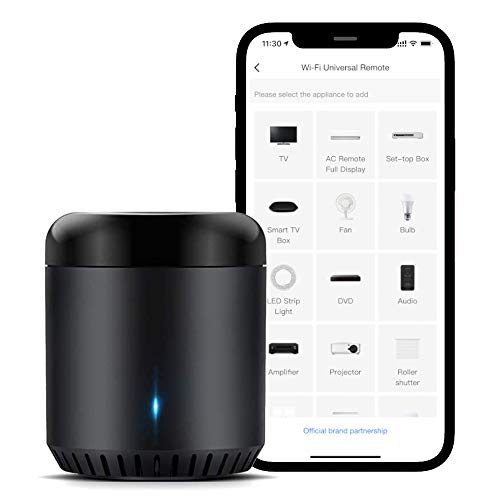 | Best Value | Primary Protocol(s): Infrared (IR) + Wi‑Fi (2.4 GHz) | Wi‑Fi Frequency: 2.4 GHz only | Power Source: AC adapter (5 V / 1 A) | VIEW LATEST PRICE | Read Our Analysis |
| MOES WiFi Smart IR Remote Controller – Alexa Compatible No Hub Required |  | Compact Power | Primary Protocol(s): Infrared (IR) + Wi‑Fi (2.4 GHz) | Wi‑Fi Frequency: 2.4 GHz only | Power Source: AC adapter (UL‑certified) | VIEW LATEST PRICE | Read Our Analysis |
| Matter Smart Home Hub M6 with Zigbee Gateway |  | Professional Grade | Primary Protocol(s): Matter + Zigbee (dual‑band Wi‑Fi) | Wi‑Fi Frequency: Dual‑band (2.4 GHz + 5 GHz) | Power Source: USB‑C charging cable (plug not included) | VIEW LATEST PRICE | Read Our Analysis |
| Tuya ZigBee 3.0 Hub Wireless Gateway (White) |  | Seamless Integration | Primary Protocol(s): Zigbee 3.0 + Bluetooth 5.0 (2.4 GHz Wi‑Fi) | Wi‑Fi Frequency: 2.4 GHz only | Power Source: USB‑C power (5 V) | VIEW LATEST PRICE | Read Our Analysis |
| Aeotec Smart Home Hub2 V4 Zigbee Matter Gateway |  | Future‑Proof | Primary Protocol(s): Matter + Zigbee (Wi‑Fi/Ethernet) | Wi‑Fi Frequency: 2.4 GHz (Wi‑Fi) or wired Ethernet | Power Source: AC adapter (included) | VIEW LATEST PRICE | Read Our Analysis |
| Smart IR Remote WiFi Hub for Home Automation | 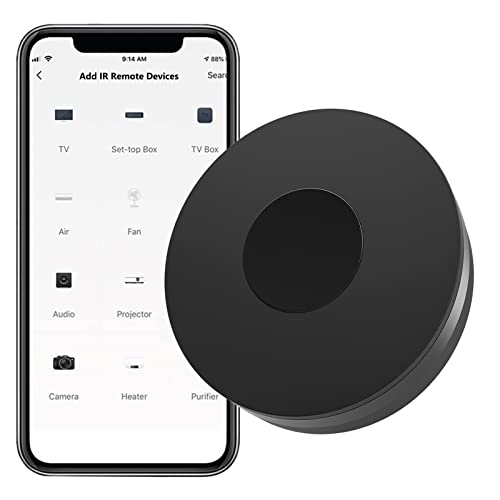 | Simple Setup | Primary Protocol(s): Infrared (IR) + Wi‑Fi (2.4 GHz) | Wi‑Fi Frequency: 2.4 GHz only | Power Source: Mini‑USB (5 V / 1 A) | VIEW LATEST PRICE | Read Our Analysis |
More Details on Our Top Picks
Tapo Smart Hub with Built-in Chime (H100)
If you want a reliable way to hear every door knock without breaking the bank, the Tapo H100 Smart Hub with built‑in chime delivers exactly that. It talks to up to 64 Tapo sensors, switches and buttons over a sub‑1 GHz low‑power protocol, so your battery‑powered devices last ten times longer than Wi‑Fi alternatives. The 30‑meter range feels generous, and the 90 dB siren plus 19 ringtones give you a doorbell that actually works.
For anyone who lives in a budget‑conscious household, this hub offers solid automation without the premium price tag. You’ll appreciate the tiny white design—just 2.83 × 2.01 × 2.24 in—and the fact it runs on 2.4 GHz Wi‑Fi for the hub itself. Controlling everything via the app or voice is a breeze, and you can set shortcuts that fit your daily routine.
What makes this smart hub stand out is its FCC‑ and RoHS‑certified peace of mind, plus a one‑year warranty and a 30‑day return window that keep risk low. The spare‑part promise lasts seven years in the EU, so you won’t be left stranded if something fails. It isn’t a lighting hub, but for sensors and alarms it’s an affordable, dependable choice.
- Primary Protocol(s):Sub‑1 GHz low‑power (Tapo)
- Wi‑Fi Frequency:2.4 GHz required for hub connectivity
- Power Source:Battery powered (hub)
- Voice Assistant Compatibility:Alexa, Google Assistant (via app)
- Mobile App Control:Tapo app (iOS/Android)
- Device Capacity (Maximum Supported Devices):Up to 64 Tapo devices
- Additional Feature:Sub‑1G low‑power protocol
- Additional Feature:90 dB siren alarm
- Additional Feature:19 selectable doorbell ringtones
SOPHIA Tuya Smart Hub WiFi Gateway with Bluetooth Bridge
If you’re tired of stretching for Bluetooth locks from the couch, this tiny white hub stretches that range for you. It plugs into a 5 V/2 A adapter and bridges your Tuya BLE door locks and sensors to your 2.4 GHz router, giving you reliable remote control. No more hopping between apps.
For anyone who wants a simple, budget‑friendly solution, the hub works with the Tuya or Smart Life apps and links to Alexa and Google Assistant if you already have them set up. You’ll see Wi‑Fi and Bluetooth status LEDs, so you always know it’s connected. It’s FCC/CE certified and handles temperatures from –10 to 55 °C, staying cool under load.
What makes this smart hub stand out is its plug‑and‑play nature—just plug it in and you’re ready to go. You get seamless Bluetooth‑to‑Wi‑Fi bridging without a pricey upgrade. The compact 2.8‑inch square fits anywhere on a shelf or nightstand. It’s perfect for renters who need a hassle‑free upgrade.
- Primary Protocol(s):Bluetooth + Wi‑Fi (2.4 GHz)
- Wi‑Fi Frequency:2.4 GHz only
- Power Source:AC adapter (5 V / 2 A)
- Voice Assistant Compatibility:Alexa, Google Assistant
- Mobile App Control:Tuya / Smart Life app
- Device Capacity (Maximum Supported Devices):Multiple BLE Mesh devices (no explicit limit)
- Additional Feature:Bluetooth Mesh support
- Additional Feature:5 V 2 A power adapter
- Additional Feature:Dual LED status indicators
THIRDREALITY Smart Bridge MZ1 – Zigbee to Matter Connectivity
If you’re tired of juggling separate apps for Zigbee gadgets, the Smart Bridge MZ1 lets you pull everything into one Matter‑enabled hub. You just plug it into your 2.4 GHz Wi‑Fi, power it with USB‑C, and the 3R‑Installer app walks you through setup and OTA updates—no batteries, no hassle. It bridges Zigbee lights, sensors, and switches to Apple HomeKit, Google Assistant, SmartThings, and Home Assistant, so your voice or phone controls it all.
For anyone who wants a tidy, budget‑friendly solution, the white, compact bridge weighs a feather‑light 1.44 oz and sits comfortably on a shelf. You won’t need a dedicated power brick; the USB‑C connection keeps it powered and out of sight. The one‑year warranty and Amazon’s return policy give you peace of mind without extra cost.
What makes this Zigbee‑to‑Matter bridge stand out is its simplicity. You install it once, then let the app handle firmware updates automatically. No extra hubs, no extra batteries—just a single device that unifies your smart home.
- Primary Protocol(s):Zigbee → Matter bridge
- Wi‑Fi Frequency:2.4 GHz (Wi‑Fi)
- Power Source:USB‑C power (adapter)
- Voice Assistant Compatibility:Alexa, Google Assistant, HomeKit, SmartThings, Home Assistant
- Mobile App Control:3R‑Installer app
- Device Capacity (Maximum Supported Devices):Unlimited Zigbee devices bridged to Matter (practical limit not stated)
- Additional Feature:USB‑C power interface
- Additional Feature:OTA firmware updates via 3R‑Installer
- Additional Feature:Compact, space‑saving design
AduroSmart ERIA Smart Home Hub (ZigBee Alexa Google)
If you’re tired of juggling a maze of ZigBee gadgets, the AduroSmart ERIA hub makes everything work together effortlessly. Its tiny 3.5‑inch square design and feather‑light 9.6‑ounce weight keep your tabletop clutter‑free. You’ll love how it talks to lights, plugs, curtains, thermostats, and locks, then hands control off to the ERIA app, Alexa, or Google Assistant. Set timers, scenes, and automations, and get push alerts when a sensor trips. Remote lock management? Yes, you can lock or unlock doors from anywhere. No Z‑Wave, no batteries—just a plug‑in hub ready out of the box.
For anyone who wants a simple, plug‑and‑play solution, the ERIA hub delivers a unified smart‑home experience without the hassle of extra dongles. Your ZigBee devices sync instantly, letting you control everything from a single app or voice command. The hub’s compact footprint fits nicely on any shelf or nightstand.
What makes this smart‑home hub stand out is its seamless integration with both Alexa and Google Assistant. You can ask your voice assistant to dim lights, lock doors, or adjust the thermostat without opening an app. The ERIA app also lets you create custom scenes that match your daily routine. It’s a straightforward way to bring order to a chaotic smart‑home setup.
You get remote lock management without any extra hardware. Simply tap a button in the app, and your door locks or unlocks instantly, no matter where you are. This feature is perfect for busy families or frequent travelers who need peace of mind.
The AduroSmart ERIA solves the problem of fragmented smart‑home control by acting as a central hub for ZigBee devices. You’ll appreciate the reliable connection and the ability to manage everything from one place. Its plug‑in design means you’re up and running in minutes right out of the box.
- Primary Protocol(s):Zigbee (2.4 GHz)
- Wi‑Fi Frequency:2.4 GHz (Wi‑Fi)
- Power Source:AC adapter (included)
- Voice Assistant Compatibility:Alexa, Google Assistant, Apple Shortcuts
- Mobile App Control:ERIA app
- Device Capacity (Maximum Supported Devices):Unlimited Zigbee devices (practical limit not stated)
- Additional Feature:Apple Shortcuts integration
- Additional Feature:Scene saving and recall
- Additional Feature:Remote lock management
Broadlink Mini 3 Smart Hub – Alexa Google Compatible
If you’re juggling a bunch of TV remotes and want to ditch the clutter, the Mini 3 turns every IR device into a single, easy‑to‑control hub. You’ll pair it with your 2.4 GHz Wi‑Fi and let the BroadLink app learn up to 50,000 commands, so you can fire up a TV, AC, or set‑top box with a tap. The app updates the library from the cloud, covering 98 % of functions you’ll need.
For anyone who loves voice control, you can link the Mini 3 to Alexa or Google Home and let your smart speaker do the work. You’ll set timers, schedules, and scenes without opening a separate app each time. The range reaches about 26 feet, line‑of‑sight only, which is plenty for a typical living room.
What makes this universal remote stand out is its low price and simple setup. You get a 5 V/1 A power adapter that plugs into any outlet, and a one‑year warranty gives you peace of mind. The 30‑day return policy means you can try it risk‑free.
- Primary Protocol(s):Infrared (IR) + Wi‑Fi (2.4 GHz)
- Wi‑Fi Frequency:2.4 GHz only
- Power Source:AC adapter (5 V / 1 A)
- Voice Assistant Compatibility:Alexa, Google Assistant, IFTTT
- Mobile App Control:BroadLink app
- Device Capacity (Maximum Supported Devices):Up to 50,000 IR devices (cloud library)
- Additional Feature:38 kHz infrared universal remote
- Additional Feature:50,000+ IR devices supported
- Additional Feature:26.2‑foot operational range
MOES WiFi Smart IR Remote Controller – Alexa Compatible No Hub Required
If you’re tired of juggling a TV remote, a fan control, and a heater switch, the MOES WiFi Smart IR Remote Controller lets you handle them all from your phone. Its 15‑meter IR beam reaches any 38 kHz device, so you can fire up a TV, AC, ceiling fan, or even a fireplace without getting up. You’ll connect the UL‑certified adapter, slip the box on a shelf, and let 2.4 GHz Wi‑Fi do the rest.
For anyone who wants voice control without a separate hub, pair the device with the Smart Life/Tuya app and Alexa or Google Assistant. You can issue commands like “turn on the living‑room fan” and the IR controller will handle it instantly. No extra hub means fewer cables and a lower price tag.
What makes this IR remote stand out is the DIY learning feature that copies any missing remote. If your brand isn’t listed, just point the original remote at the controller and let it learn the codes. You’ll never be stuck with an unsupported device again.
You get reliable control without breaking the bank. The unit weighs only 0.22 lb, so it’s easy to place anywhere, and one per room works best because IR can’t pass through walls. It’s a practical, no‑fuss addition to a budget‑friendly smart home.
- Primary Protocol(s):Infrared (IR) + Wi‑Fi (2.4 GHz)
- Wi‑Fi Frequency:2.4 GHz only
- Power Source:AC adapter (UL‑certified)
- Voice Assistant Compatibility:Alexa, Google Assistant
- Mobile App Control:Smart Life / Tuya app
- Device Capacity (Maximum Supported Devices):1 IR device per unit (learning)
- Additional Feature:DIY learning copy function
- Additional Feature:12 programmable buttons
- Additional Feature:15‑meter infrared range
Matter Smart Home Hub M6 with Zigbee Gateway
If you’re trying to control a mix of Zigbee lights, sensors and plugs without juggling several hubs, the Matter‑compatible M6 does the heavy lifting for you. It pairs with over 125 devices straight out of the box, so you can set up a whole floor of smart gear in minutes. The long‑range antenna keeps the signal strong even on the upstairs balcony.
For anyone who wants fast remote access, the dual‑band Wi‑Fi (802.11ac/ax) delivers a solid 4.8 Gbps upstream ceiling, meaning OTA updates and cloud control happen instantly. You’ll plug it in, download the app, and watch it connect without breaking a sweat.
What makes this hub stand out is its seamless tie‑in with Tuya, Google Home and SmartThings, giving you flexibility across platforms. Alexa integration still needs a workaround, but that’s a minor hiccup for most users.
You get a 30‑day return guarantee and a simple user manual, so testing the M6 is risk‑free. Perfect for multi‑story houses, this hub keeps your smart‑home ecosystem unified and reliable.
- Primary Protocol(s):Matter + Zigbee (dual‑band Wi‑Fi)
- Wi‑Fi Frequency:Dual‑band (2.4 GHz + 5 GHz)
- Power Source:USB‑C charging cable (plug not included)
- Voice Assistant Compatibility:Google Home, SmartThings (Alexa not yet)
- Mobile App Control:Blindsmart app
- Device Capacity (Maximum Supported Devices):125+ Zigbee devices
- Additional Feature:125+ Zigbee device capacity
- Additional Feature:4800 Mbps upstream data rate
- Additional Feature:Dual‑band Wi‑Fi (802.11ac/ax)
Tuya ZigBee 3.0 Hub Wireless Gateway (White)
If you’re trying to connect a bunch of Tuya lights and sensors without a pricey hub, this tiny white gateway does the job. You just plug the Type‑C cable in, fire up the Smart Life or Tuya Smart app, and pair devices in seconds—no Ethernet required. The hub runs on 2.4 GHz Wi‑Fi, supports ZigBee 3.0 and Bluetooth 5.0, and fits in a palm‑sized box (2 × 1 × 1 in, 1.76 oz).
For anyone who already has Tuya‑protocol gear, you’ll love the effortless integration. Just make sure your devices use the Tuya protocol before you buy. You get a two‑year warranty and a 30‑day return window, so you can try it risk‑free.
What makes this hub stand out is its low price and simple setup. You won’t need a separate router or a complicated network. It keeps your smart bulbs, plugs, and sensors online while sipping minimal power.
You get reliable connectivity without sacrificing space. The device is small enough to hide behind a plug, yet strong enough to handle multiple ZigBee devices. It’s a practical solution for anyone looking to expand their smart home on a budget.
- Primary Protocol(s):Zigbee 3.0 + Bluetooth 5.0 (2.4 GHz Wi‑Fi)
- Wi‑Fi Frequency:2.4 GHz only
- Power Source:USB‑C power (5 V)
- Voice Assistant Compatibility:Alexa, Google Assistant (via Tuya/Smart Life)
- Mobile App Control:Smart Life / Tuya Smart app
- Device Capacity (Maximum Supported Devices):Zigbee 3.0 devices (practical limit not stated)
- Additional Feature:Bluetooth 5.0 dual‑mode gateway
- Additional Feature:Type‑C power cable
- Additional Feature:2‑year warranty
Aeotec Smart Home Hub2 V4 Zigbee Matter Gateway
If you’re tired of hubs that quit when the internet drops, the Aeotec Smart Home Hub2 V4 keeps your lights and sensors running locally. You’ll plug it in, connect via Wi‑Fi or Ethernet, and it instantly recognises Matter, Zigbee, and SmartThings devices. No more hassle when the service blips.
For anyone who wants voice control without extra hubs, Alexa and Google Assistant work right out of the box. You can ask your lights to turn on even if your router is offline. The hub’s built‑in media adapter also lets you add extra peripherals easily.
What makes this smart‑home hub stand out is its compact, white design that fits any space. You get an adapter and Ethernet cable included, so setup is quick and tidy. Perfect for apartments or houses alike.
You get reliable local automations without sacrificing connectivity. The hub stays responsive, keeping your smart home functional at all times. It’s a straightforward solution for everyday convenience.
- Primary Protocol(s):Matter + Zigbee (Wi‑Fi/Ethernet)
- Wi‑Fi Frequency:2.4 GHz (Wi‑Fi) or wired Ethernet
- Power Source:AC adapter (included)
- Voice Assistant Compatibility:Alexa, Google Assistant
- Mobile App Control:SmartThings app (hub)
- Device Capacity (Maximum Supported Devices):Thousands of Zigbee devices (via SmartThings)
- Additional Feature:Built‑in media adapter
- Additional Feature:Local automations without internet
- Additional Feature:Ethernet and Wi‑Fi setup
Smart IR Remote WiFi Hub for Home Automation
If you’re tired of juggling dozens of remote controls, the Zecamin RC‑IR Hub puts all those devices under one app. You simply plug the mini‑USB into any wall adapter, connect it to your 2.4 GHz Wi‑Fi, and the Tuya Smart or Smart Life app finds it instantly. From there you can control up to 100 IR devices—TVs, ACs, soundbars, fans, curtain remotes—within a 7‑10 meter radius and even fire commands from anywhere.
For anyone who wants voice control without the hassle, Alexa and Google Assistant work out of the box. You can set timers or scenes for automated routines, so your living room lights dim when the TV turns on. The device draws just 0.55 W, fits in a 68 × 68 × 24 mm black box, and comes with a USB cable and manual.
What makes this smart hub stand out is its low‑cost, all‑in‑one design that feels like a remote‑control Swiss army knife. You get a tidy setup without needing a separate hub for each device. Perfect for renters or anyone who doesn’t want to drill holes, it’s easy to move and install.
- Primary Protocol(s):Infrared (IR) + Wi‑Fi (2.4 GHz)
- Wi‑Fi Frequency:2.4 GHz only
- Power Source:Mini‑USB (5 V / 1 A)
- Voice Assistant Compatibility:Alexa, Google Assistant, IFTTT
- Mobile App Control:Tuya Smart / Smart Life app
- Device Capacity (Maximum Supported Devices):Up to 100 IR devices (user‑defined)
- Additional Feature:360° infrared angle
- Additional Feature:Mini USB power supply
- Additional Feature:DIY manual learning for unsupported devices
Factors to Consider When Choosing an Affordable Smart Home Hub
If you’re tired of gadgets that won’t talk to each other, you need a hub that handles Zigbee, Z‑Wave, Wi‑Fi and any other protocol your devices use. That kind of compatibility keeps your lights, locks and sensors working together without a hitch. It also means you won’t have to buy a new hub every time you add a different brand.
For anyone who worries about a dead hub in the middle of the night, battery life and efficiency are non‑negotiable. Choose a model that stays powered for months on a single charge, so you won’t be scrambling for a replacement when the power goes out. A strong, reliable signal ensures every corner of your home stays covered.
What makes this smart home hub stand out is its voice‑assistant flexibility. It understands Alexa, Google Assistant or Siri, letting you control everything with the assistant you already love. You can still plug in quirky smart plugs and sensors without a compatibility nightmare.
You get solid range without sacrificing speed. A robust radio and can reach the farthest rooms, so you won’t lose control of a thermostat in the attic. The hub’s efficient design also keeps your electricity bill low.
Perfect for busy families, this hub simplifies daily routines. It automates lights, locks and thermostats based on your schedule, freeing you from manual tweaks. You’ll notice the convenience the the moment you set it up.
Protocol Compatibility Standards Compatibility
If you’re tired of gadgets that just won’t talk to each other, you need a hub that supports the same wireless languages as your devices. It should handle Zigbee, Z‑Wave, Matter, Thread, Bluetooth, or 2.4 GHz Wi‑Fi, so you can mix lights, locks, and sensors without a hitch. Look for simultaneous multi‑protocol support or a bridge that links low‑power mesh to IP networks.
For anyone who wants a hassle‑free smart home, Matter support is a lifesaver, letting you control different brands through Google, Apple, or Amazon with ease. It also means you can keep your system running locally, so a brief internet outage won’t stall your lights or locks.
What makes this hub stand out is its ability to run locally for those protocols, keeping latency low and privacy high. You get reliable performance even when the cloud is offline. This way your smart home humming humming smoothly.
Battery Life Efficiency
If you want your battery‑powered sensors to last weeks instead of days, pick a hub that runs a low‑energy wireless protocol. Sub‑1 GHz and Zigbee use far less power than Wi‑Fi, so your sensors stay alive much longer. You’ll notice a big difference when the hub sleeps between heartbeats—seconds, not milliseconds—because the duty cycle stays how often devices need to wake up.
For anyone who runs a mesh network, the hub’s role as a relay matters. A hub that maintains a solid link prevents unnecessary retransmissions, keeping the sensor’s power draw low. You don’t have to worry about your devices constantly cranking up power.
What makes this hub stand out is its gentle firmware update policy. Frequent OTA pushes or heavy telemetry can drain a battery faster than a toddler on a sugar rush, so a hub that limits updates to essential data will keep your batteries happy. You get longer sensor life without sacrificing reliability.
Range & Signal Strength
If you’re trying to keep every corner of a multi‑story home covered, the hub’s wireless band matters. You’ll want a model that talks 2.4 GHz Wi‑Fi, sub‑1 GHz, or Zigbee—lower frequencies cut through walls better, so sub‑1 GHz often reaches farther than 2.4 GHz. Check the lab‑rated max distances, but real‑world walls, floors, and other Wi‑Fi or microwaves will shave those numbers down.
For anyone who lives in a house with several levels, a hub that supports mesh or a high device count keeps the signal alive upstairs and in the basement. Placement matters too—central, elevated spots and a solid antenna boost range, and an Ethernet backhaul can turn a flaky wireless link into a rock‑solid highway.
What makes this hub stand out is the ability to avoid dead zones without spending a fortune. You get strong coverage and easy setup, so you can stream, work, and smart‑home devices without interruption. Keep these knobs in mind and you’ll stay connected everywhere.
Voice Assistant Compatibility
If you’ve ever tried to say “Hey, lights on” and got nothing back, you know how annoying a mismatched hub can be. For anyone who uses Alexa, Google Assistant, Siri, or a mix, pick a hub that actually talks to the assistants you already love. What makes a good hub stand out is that it supports multiple assistants without forcing you to juggle separate accounts. You get seamless voice control without sacrificing privacy, because some models process commands locally instead of sending everything to the cloud. The [product name] solves the “assistant‑only” problem by offering built‑in support for Alexa, Google, and Siri in one device. Perfect for a busy family, this hub lets you control lights, locks, and thermostats all from the voice assistant you prefer. You won’t need a third‑party bridge that adds latency or ties you to a single service. If you care about privacy, look for a hub that does local voice processing so your commands still work during an outage. The ecosystem should expose all the device types you need, otherwise you’ll end up with hidden commands that never fire. Finally, if you want to use more than one assistant, choose a hub that streamlines account linking instead of making you set up each voice separately. This way you avoid the frustration of “Why isn’t this working?” and keep your smart home truly smart.
Device Compatibility Breadth
If you want every smart gadget you own to talk to each other without a headache, make sure the hub supports the right wireless protocols. Look for Zigbee, Z‑Wave, Matter, Bluetooth, Wi‑Fi and even sub‑1G, because a missing protocol will stop pairing before you even try. Some hubs can juggle a few dozen devices, while others handle more than a hundred, which matters when you’re stacking sensors, bulbs and locks. You’ll also want the hub to cover the categories you need—lights, locks, thermostats, IR blasters—so you don’t end up with a broken arm on a robot. Check whether it works locally or relies on the cloud, and see if it bridges ecosystems like HomeKit, Google, Alexa, Tuya or Matter. Multi‑protocol gateways, such as Zigbee‑to‑Matter or Bluetooth‑to‑Wi‑Fi bridges, let legacy or niche devices stay in the party without a full replacement. This way you can mix platforms and keep everything running smoothly.
Automation & Scheduling Features
If you want your smart home to react instantly, make sure the hub runs automations offline. You’ll notice the difference when lights, plugs, and locks all fire together without a laggy cloud delay. For anyone who loves a tidy setup, group scenes let you control multiple devices with a single tap, and there’s no ridiculous limit on how many you can bundle. You get flexible triggers—sensor events, geofencing, button presses, or voice commands—so your routine stays truly yours. The hub lets you clone, edit, and disable automations without breaking the whole system, keeping tinkering safe and simple. In short, prioritize offline execution and robust scene handling, and you’ll avoid a hub that talks a lot but does little.
Setup Simplicity
If you’ve ever wrestled with a stubborn Wi‑Fi router while trying to set up a hub, you’ll love a system that pairs in seconds. Quick Bluetooth or 2.4 GHz Wi‑Fi pairing gets you online fast, and the in‑app guide walks you through each step without cryptic menus. Plug‑and‑play features like QR‑code scans or one‑touch pairing cut the manual steps dramatically.
For anyone who wants a hassle‑free smart‑home experience, this hub works with your existing network so you don’t have to re‑configure the router just to add a light switch. Ethernet ports, LED status lights, and OTA firmware updates keep troubleshooting simple. You’ll have an in‑app help guide or video tutorial ready for those “what‑now?” moments.
What makes this hub stand out is the way it lets you spend minutes, not hours, getting everything up and running. The design focuses on your convenience, delivering a breezy setup that feels like a backyard BBQ, not a wrestling match. No extra steps, no extra stress.
Price‑to‑Feature Ratio
If you’re trying to stretch your smart‑home budget, start by matching the hub’s protocols to the devices you already own. A cheap hub that only speaks Wi‑Fi will force you to buy pricey Zigbee or Z‑Wave add‑ons later, and that quickly erodes any savings. Look for a model that handles at least twenty endpoints so your collection can grow without a new hub.
For anyone who wants reliable coverage, check the mesh range and device capacity before you buy. A hub that can only manage a handful of nodes will leave dead zones as you add more lights or sensors. Choose one with a strong dual‑band Wi‑Fi or Ethernet connection to keep the network stable.
What makes this hub stand out is the inclusion of local automations and OTA updates without a subscription. You’ll keep your automations running even if the cloud goes down, and you won’t be hit with monthly fees.
You get a solid warranty and long‑term firmware support, so you won’t need to replace the hub after a year. A short‑lived hub loses value faster than a higher upfront price.
Perfect for DIY enthusiasts, this hub also offers voice‑assistant integration that’s ready out of the box. No extra dongles or paid upgrades are required to get Alexa or Google Assistant working.
The hub’s power option—battery or AC—lets you place it wherever you need it without worrying about outlet access. A weak link in power can trigger costly network upgrades, so pick a model that fits your setup.
Finally, consider the accessory ecosystem; a hub with a thriving third‑party market gives you more flexibility down you expand. Short‑term support means you’ll lose out on new features and compatibility.
Frequently Asked Questions
What Warranty Coverage Do These Hubs Typically Include?
I’m sure you’ve noticed that roughly 80 % of budget hubs ship with a one‑year limited warranty covering defects and hardware failures. You’ll usually get free replacement or repair within that period, but consumables like batteries aren’t covered. Some brands throw in a 90‑day “no‑questions‑asked” return window, and a few offer optional extended plans for an extra fee. Keep an eye on the fine print—shipping costs can be excluded.
Can These Hubs Operate Without a Constant Internet Connection?
You can run most affordable hubs offline for basic tasks, but they’ll need internet for cloud‑based features like voice assistants, remote access, and firmware updates. Locally, they’ll still control Zigbee or Wi‑Fi devices, run schedules, and respond to local commands. However, anything that relies on external services—like Alexa or Google Assistant—will stop working without a connection. So, expect core automation to stay alive, but expect the fancy cloud perks to disappear.
Do Any of These Hubs Support Thread Network Integration?
You’ll be glad to hear that several affordable hubs do support Thread. The Echo 4th Gen includes a Thread radio, so you can add Thread‑only devices without a separate bridge. The newer Google Nest Hub Max also ships with Thread, and the Homey Mini adds it via a dongle if you need extra ports. I lean toward Echo for its price‑to‑feature ratio, but Nest feels a bit smoother if you’re already in the Google ecosystem.
How Do Firmware Updates Affect Hub Compatibility With Existing Devices?
You’ve probably noticed firmware updates can be a double‑edged sword. When the hub pushes a new version, it usually adds bug fixes and security patches, which keeps your devices safe. But sometimes the update changes the API or drops support for older protocols, so a light‑bulb or sensor that once worked might stop responding. Most reputable hubs keep backward compatibility, yet you should read the release notes and back up your config before you hit “Update.”
Are There Any Known Privacy Concerns With the Included Voice Assistants?
I’m sure you’ve wondered if those voice assistants are spying on you. The short answer: they collect audio snippets to improve services, but you can mute or delete recordings in settings. Some hubs store data in the cloud, which raises a risk if the provider gets breached. Look for on‑device processing options—those keep your commands local. In short, you’re not being watched constantly, but you should manage permissions and choose hubs that let you control data retention.